Works with Xero · Pro and Business

Your CRM and Xero, finally talking.

DealJar sends quotes to Xero as drafts, with the right lines and GST, then brings back what Xero knows: who's paid, who owes you, and who's due to buy again. Nothing is approved or emailed from Xero without you.

How it works

From first enquiry to paid, in one place.

DealJar runs the sale. Xero runs the books. Here's where they meet.

  1. Enquiry

    A website form, an email or a call lands on your board as a deal. If they're already a customer in Xero, you see their spend and any overdue balance.

  2. Quote

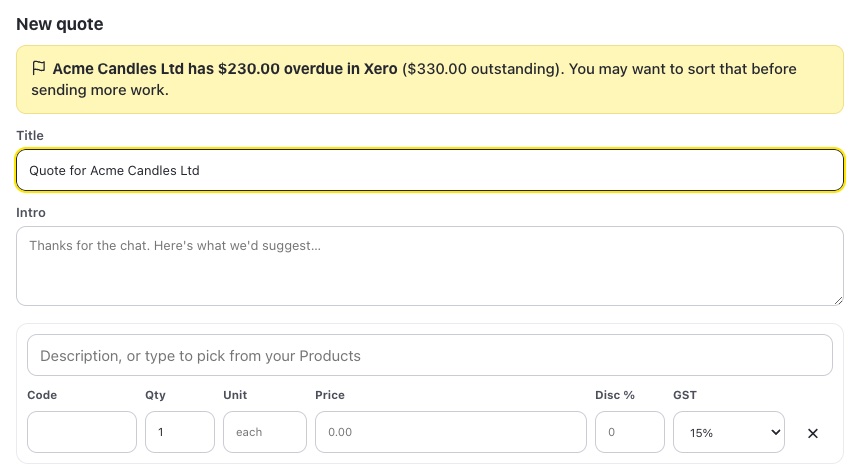
    Build the quote from your Xero products and services, with GST worked out per line. If they owe you money, DealJar warns you first.

  3. Signed

    The customer accepts the quote online or signs the agreement. The deal moves to Won.

  4. Xero invoice

    Send the deal to Xero, or let DealJar do it when the deal is won. It arrives as a draft invoice with the same lines, item codes and GST, for you to approve in Xero.

  5. Paid

    DealJar checks the invoice every hour. Awaiting payment, overdue and paid show on the deal and the agreement, and Today reminds you when they're due to buy again.

What it does

Everything DealJar does with Xero today.

All of this is live now on the Pro and Business plans.

Draft invoices and quotes

When a deal is won (or whenever you choose), DealJar creates a draft invoice or a draft quote in Xero. The lines come straight from your DealJar quote: descriptions, quantities, line discounts, item codes for products that came from Xero, and the right GST code for each line (15% GST, zero-rated or exempt). Each deal gets one invoice and one quote, so pressing the button twice never makes duplicates.

Products from Xero

Your Xero items (products and services) come into DealJar's Products list with their codes, descriptions and sale prices. Type in a quote line to pick one. Fields that Xero owns stay locked in DealJar so the two never drift apart. Sync hourly, daily or only when you press Sync.

Payment status on the deal

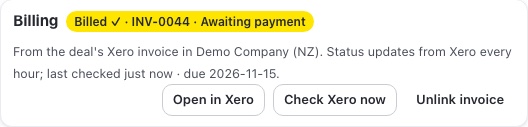
DealJar checks the invoice in Xero every hour (and whenever you press Check now). The deal shows the invoice number and whether it's a draft, awaiting payment, overdue or paid, and each change is written to the deal's timeline.

Customer money

A company's page shows what they've spent with you in Xero (paid and sent invoices; drafts and voided ones are left out), when they last bought, what's outstanding and what's overdue, plus their recent invoices with a link to each one in Xero. The same card sits on the deal.

Overdue warnings

If a customer has overdue invoices in Xero, their deals get a red flag on the board and a note on the deal ("Customer has $230 overdue in Xero"). You also see a warning when you start a new quote or proforma, or copy a quote link, so you can sort it out before sending more work.

Reorder reminders

DealJar looks at the gap between each customer's past orders in Xero (per product, once there are at least three orders) and puts them on Today when they're well past their usual gap: "Acme usually reorders Soy candle every 6 weeks, and it's been 8". Snooze or dismiss each one, or turn reminders off in Settings.

Renewal reminders

Repeating invoices in Xero show on the company and the deal with the next date, amount, frequency and end date. Ones ending within 30 days show on Today, so a renewal conversation happens before the billing stops.

Contacts without duplicates

When DealJar sends a company or person to Xero, it looks for them first (by link, then email, then name) and only creates a contact when there's no match. When your name for a customer differs from Xero's (a trading name, or “Auckland Council / Te Rōpū Kaunihera” against “Auckland Council”), link them yourself: search Xero by name, email or account number from the company page or the deal, and see each result's outstanding balance so the right one is obvious. If a deal isn't linked when you send it to Xero, DealJar asks which contact it's for first, and Settings lists every company with deals that still needs linking. Linked records take Xero's newer changes to name, email, phone, address, GST number and payment terms, and each change is logged. Possible matches are suggested for you to confirm; nothing is merged automatically. Updating Xero from DealJar is off until you turn it on, and you see exactly what would change first.

Your Xero settings

DealJar reads your organisation's payment terms, sales tax rates and branding themes once a day. Due dates on proforma invoices and on drafts sent to Xero use the customer's own Xero terms first, then yours. Your Xero tax rates are shown in Settings so you can check GST matches, and you choose which branding theme DealJar's drafts use in Xero.

Proforma invoices

Create a proforma invoice from any quote: numbered in its own series, labelled “Proforma invoice — not a tax invoice”, with your payment terms, GST number and bank details, and emailed as a PDF. With Xero connected, the due date follows the customer's Xero payment terms. (Proformas themselves are on every plan.)

Agreement billing

Once an agreement is signed, bill it with Send to Xero (the deal's draft invoice) or link an invoice that's already in Xero by its number. The agreement then shows the invoice number and whether it's awaiting payment, overdue or paid, and the Agreements list can be filtered by billing status.

Nothing happens behind your back

DealJar only ever creates drafts in Xero. It never approves an invoice, never emails one from Xero, and never overwrites an existing Xero contact unless you've turned on contact updates. If Xero's connection needs renewing, you see a banner straight away. Disconnect at any time from Settings.

See it

The real app, with made-up customers.

Screenshots of DealJar connected to a test Xero organisation. Every business in them is fictional.

A company page in DealJar showing customer money from Xero: lifetime spend, last purchase, outstanding and overdue, with recent invoices marked draft, awaiting payment, overdue and paid (fictional data)
Customer money on the company page.
The New quote dialog in DealJar warning that the customer has $230.00 overdue in Xero (fictional data)
A warning before you quote a customer who owes you money.
DealJar Xero sync settings: hourly sync, import changes from Xero on, update Xero contacts off, review matches, payment terms and branding theme (fictional data)
Sync settings: updating Xero contacts stays off until you turn it on.
A signed agreement's billing panel showing invoice INV-0044 awaiting payment, with Open in Xero and Check Xero now buttons (fictional data)
Invoice number and payment status on a signed agreement.

What syncs which way

Exactly what moves, and when.

WhatDirectionWhen
Draft invoices and draft quotes (lines, item codes, GST)DealJar → XeroWhen you press Send, or when a deal is won if you turn that on
New contacts, only when there's no existing matchDealJar → XeroWhen you send a deal or press Sync contacts
Contact changes (name, email, phone, address, GST number)Both ways (optional)Hourly. DealJar to Xero is off until you turn it on, after a preview
Invoice and payment statusXero → DealJarHourly, and whenever you press Check now
Sales invoices (spend, overdue, reorder patterns)Xero → DealJarHourly
Repeating invoices (renewals)Xero → DealJarHourly
Products and servicesXero → DealJarHourly, daily or when you press Sync
Payment terms, tax rates, branding themesXero → DealJarDaily

Safety and permissions

Your books stay yours.

Drafts only

DealJar creates draft invoices and quotes. It never approves an invoice or emails one from Xero. You do that in Xero, when you're ready.

You connect it, you control it

Only owners and admins can connect Xero, using Xero's own sign-in. DealJar never sees your Xero password, and you can disconnect at any time from Settings.

Contacts are never merged behind your back

Possible matches are suggested for you to confirm. Updating Xero contacts from DealJar is off until you turn it on, and you see every change first.

Only the access it needs

DealJar asks Xero for contacts, invoices and read-only settings. It doesn't touch bank accounts, payroll or reports.

Encrypted and in Oceania

The Xero connection is stored encrypted, on Cloudflare's network with data in its Oceania region. Xero data is never used to train AI.

You'll know if it breaks

If Xero's connection needs renewing, you see a banner in DealJar straight away, so nothing silently stops syncing.

Questions

Xero questions, answered.

What syncs which way?

DealJar to Xero: draft invoices and draft quotes (with lines, item codes and GST), and new contacts when there's no match. Contact updates go to Xero only if you turn that on. Xero to DealJar: invoice and payment status, sales invoices (for customer spend, overdue balances and reorder reminders), repeating invoices, products and services, contact changes for linked records, and your payment terms, tax rates and branding themes.

How often does it sync?

Invoice status, sales invoices, contacts and repeating invoices are read every hour, and you can press Sync now at any time. Products sync hourly, daily or only when you ask. Payment terms, tax rates and branding themes are refreshed once a day. Drafts are sent to Xero the moment you press Send (or when a deal is won, if you turn that on).

Does DealJar change anything in Xero?

Only what you ask for. It creates draft invoices and draft quotes, and creates a contact when there's no existing match. It never approves or emails an invoice from Xero, and it doesn't change existing Xero contacts unless you turn on contact updates, which shows you every change first and only touches contacts you've linked.

Which plans include Xero?

Pro and Business, and the 14-day Pro trial. Owners and admins connect Xero from Settings. Proforma invoices and the products list are on every plan; syncing them with Xero needs Pro or Business.

What if DealJar picks the wrong Xero contact, or none?

Link it yourself. On the company page or the deal's Xero panel, search Xero by name, email or account number and pick the right contact; change or unlink it at any time, and each change is noted on the deal's timeline. Linking only reads from Xero; it never changes the contact in Xero.

Is DealJar made by Xero?

No. DealJar is an independent New Zealand product made by Rebellion Digital that connects to your Xero organisation with your permission. Xero is a trademark of Xero Limited.

What does DealJar store from Xero?

What it needs to show the features above: invoice numbers, dates, amounts and status, contact details for linked records, products, repeating invoices and your organisation's terms, tax rates and branding themes. Your Xero sign-in is never seen by DealJar, the connection is encrypted, and Xero data is never used to train AI. Disconnecting stops all syncing.

Xero is a trademark of Xero Limited. DealJar is an independent product that works with Xero and isn't affiliated with, endorsed or certified by Xero.
Try it with your own Xero.

Start a 14-day Pro trial, connect Xero from Settings, and send your first draft invoice. No card needed.

Start your free trial